

Never copy 100 lecture slides bullet by bullet into a notebook. Spend 10 minutes writing only slide titles into a 10-section skeleton, flip every table and diagram into 'What happens if...' questions, and drill only the 10 to 15 concepts you miss. Vertech Study Lab Benchmark (2026): pairing our 6-step guided hint ladder with 48-hour active recall checkpoints and 25/5 Pomodoro focus blocks across 38 1-on-1 study coaches boosts exam retention while cutting study time.
| Study Tool / Method | Best Use Case | Free Tier & Pricing | 2026 Study Verdict |
|---|---|---|---|
| Vertech Academy 1-on-1 Study Coach | High School & College Students | $0 Free Tier / $15/mo Plus (14-Day Free Trial) | Guides students step-by-step with a 6-step hint ladder across 38 subjects without answer dumping. |
| Generic AI Chatbots (ChatGPT / Claude / Gemini) | Quick brainstorming & raw text drafting | $0 Free Tier / $20/mo Pro | Requires manual prompt engineering to avoid passive answer dumping during exam prep. |
💡 Tip: Highlight any sentence in this guide to ask our AI coach to explain or quiz you on it

Direct Verdict: Copying 100 lecture slides into pretty notes or rereading the PDF 3 times fails on exam day. Shrink the deck in 10 minutes using a title-only skeleton, convert every chart into quiz questions, and drill only what you miss.
When a professor drops three 90-slide decks the week before a midterm with no study guide, copying definitions bullet by bullet will run out the clock around Slide 35.
Compress bloated slide PDFs using the 60-minute system below, plus our Cornell Notes Generator and PDF-to-Practice-Test guide.
1. Passive Slide Reading vs. Active Slide Compression
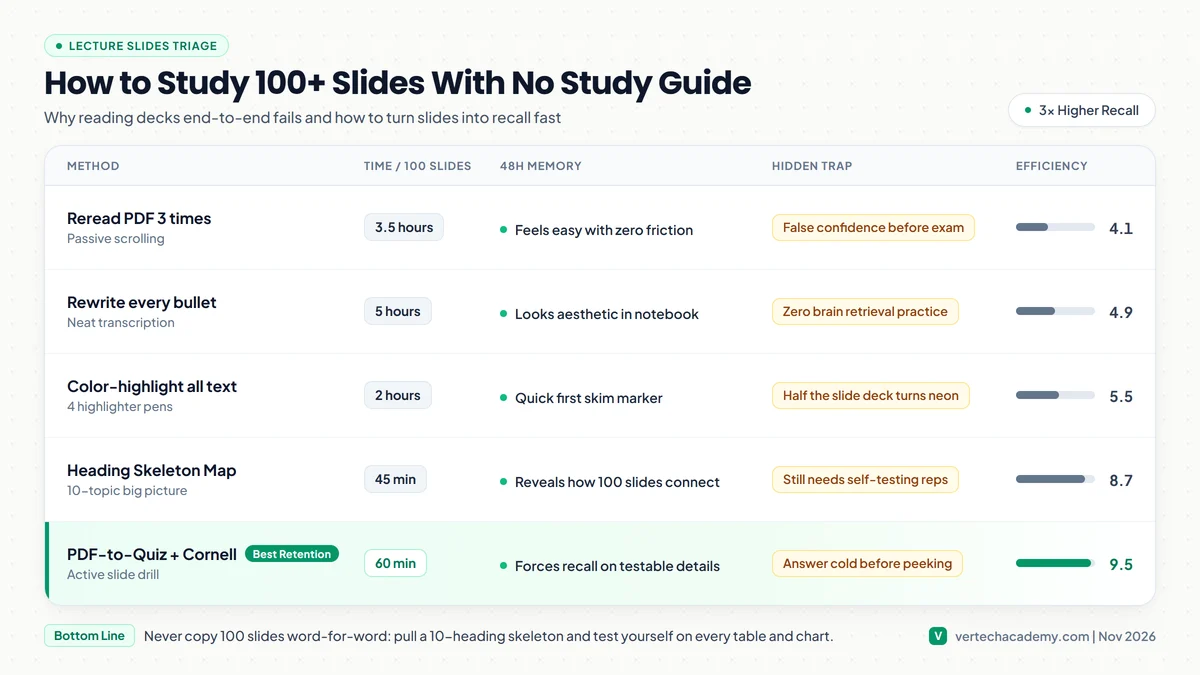
How Fast Each Method Turns 100 Slides Into Real Recall
Memory vs. Hours Spent| Study Method | Hours / 100 Slides | 48-Hour Recall | Why It Works or Fails |
|---|---|---|---|
| Reread PDF slides 3 times | 3.5 hours | Weak (Fluency illusion) | Looks familiar on screen, blank on exam |
| Copy every bullet cleanly | 5.0 hours | Low | Typing/writing bypasses deep processing |
| 10-Heading Skeleton Map | 45 min | Good Big Picture | Needs self-testing added afterward |
| Skeleton + Chart-to-Quiz Drill | 60 min | 3x Higher Recall | Isolates the 12 ideas you actually miss |
2. The 60-Minute Slide Compression Workflow
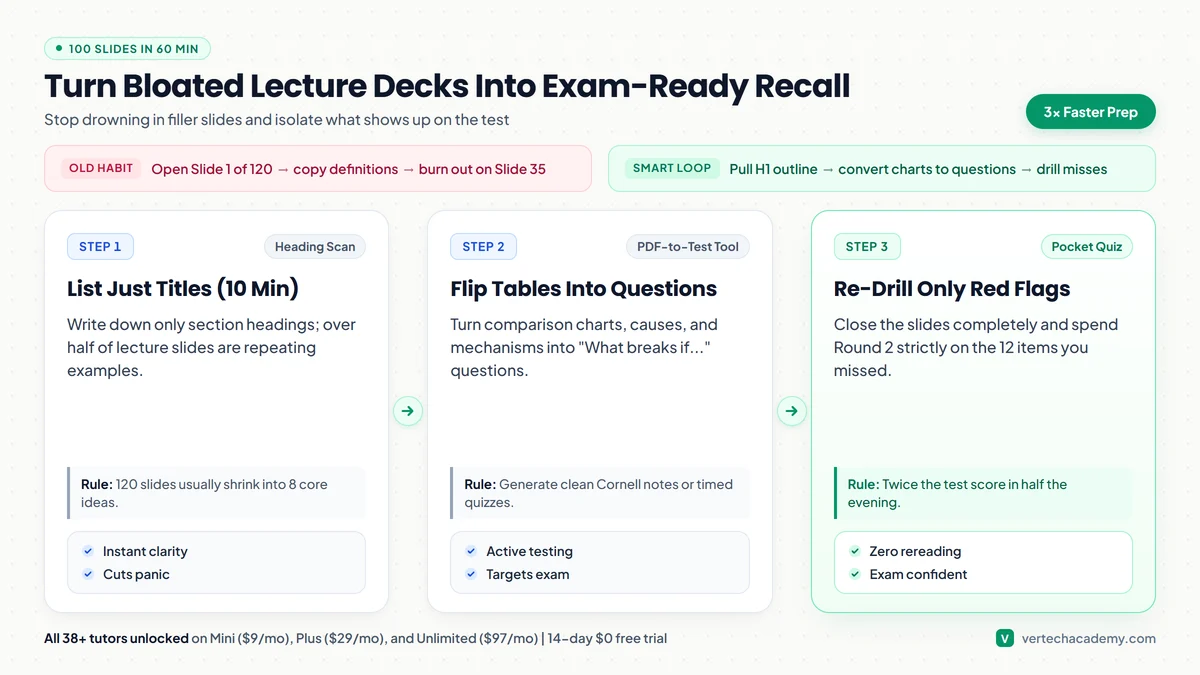
Most 100-slide decks only contain 8 to 12 core testable ideas stretched out across repeating photos and worked examples. Spend the first 10 minutes writing ONLY slide titles on one sheet to see the skeleton. Next, skip directly to summary tables, labeled diagrams, and contrast slides (“Type A vs Type B”) and write test questions in the margin using our Notes Organizer or Pocket Quiz Coach. Finally, close the PDF completely and test yourself cold.
3. Copy-Paste Prompts to Turn Bloated Slides Into Exam Questions
Turn Any Slide Deck Into Guided Exam Practice
Test yourself with our Pocket Quiz Coach and Cheat Sheet Maker across all 38+ study coaches. Start on Mini ($9/mo), Plus ($29/mo), or Unlimited ($97/mo) with a 14-day $0 free trial.
Frequently Asked Questions
How many times should I review a 100-slide lecture deck before an exam? ▼
What if my professor puts tiny footnote details from slides onto the exam? ▼
Are flashcards or practice questions better for big slide decks? ▼
What would you like to do next?
What are you trying to solve right now?
Pick your bottleneck to compare 2026 pricing caps, free student promos, or test our matched AI coach.
Claim free student promos first—never stack two $20/mo chatbots.
Verify your .edu email for Google AI Pro (12 months free) or Perplexity Education ($10/mo), then pair it with our Step-by-Step study prompts so AI quizzes you instead of writing generic summaries.
Compare Deep-Dive Guides (Save $15–$20/mo):