


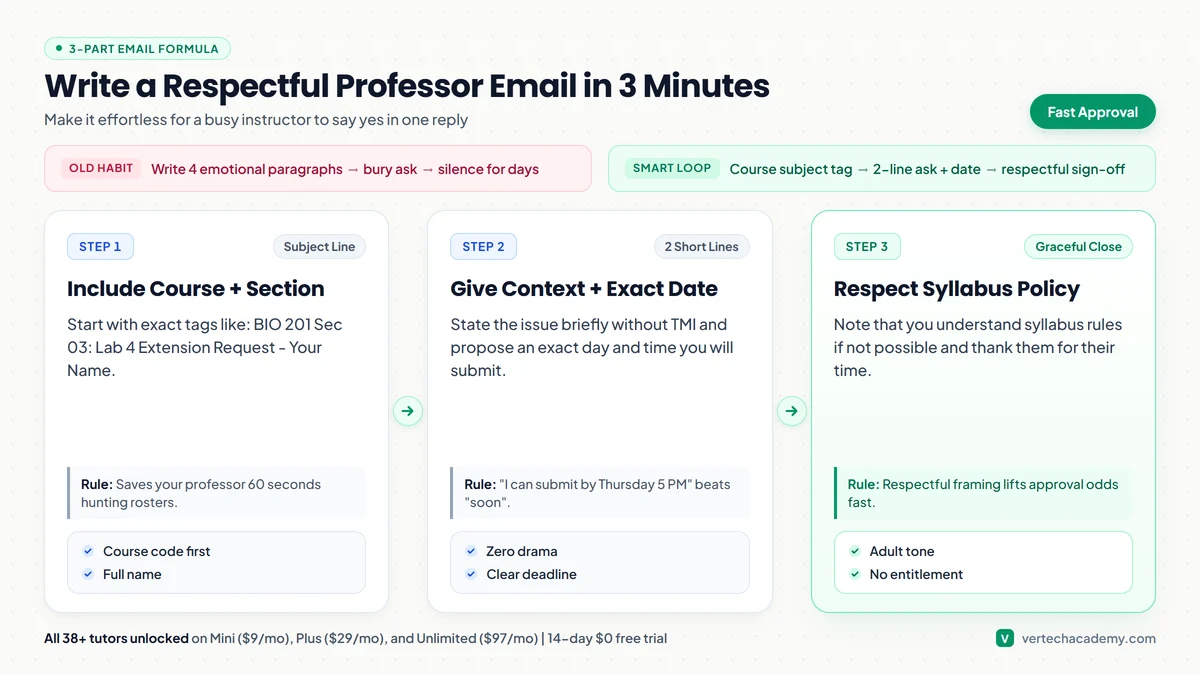
Keep every professor email under 4 to 6 crisp lines: put your exact course and section in the subject, skip graphic medical or personal over-sharing, propose one concrete new submission day/time, and explicitly state you respect the syllabus policy. Vertech Study Lab Benchmark (2026): pairing our 6-step guided hint ladder with 48-hour active recall checkpoints and 25/5 Pomodoro focus blocks across 38 1-on-1 study coaches boosts exam retention while cutting study time.
| Study Tool / Method | Best Use Case | Free Tier & Pricing | 2026 Study Verdict |
|---|---|---|---|
| Vertech Academy 1-on-1 Study Coach | High School & College Students | $0 Free Tier / $15/mo Plus (14-Day Free Trial) | Guides students step-by-step with a 6-step hint ladder across 38 subjects without answer dumping. |
| Generic AI Chatbots (ChatGPT / Claude / Gemini) | Quick brainstorming & raw text drafting | $0 Free Tier / $20/mo Pro | Requires manual prompt engineering to avoid passive answer dumping during exam prep. |
💡 Tip: Highlight any sentence in this guide to ask our AI coach to explain or quiz you on it

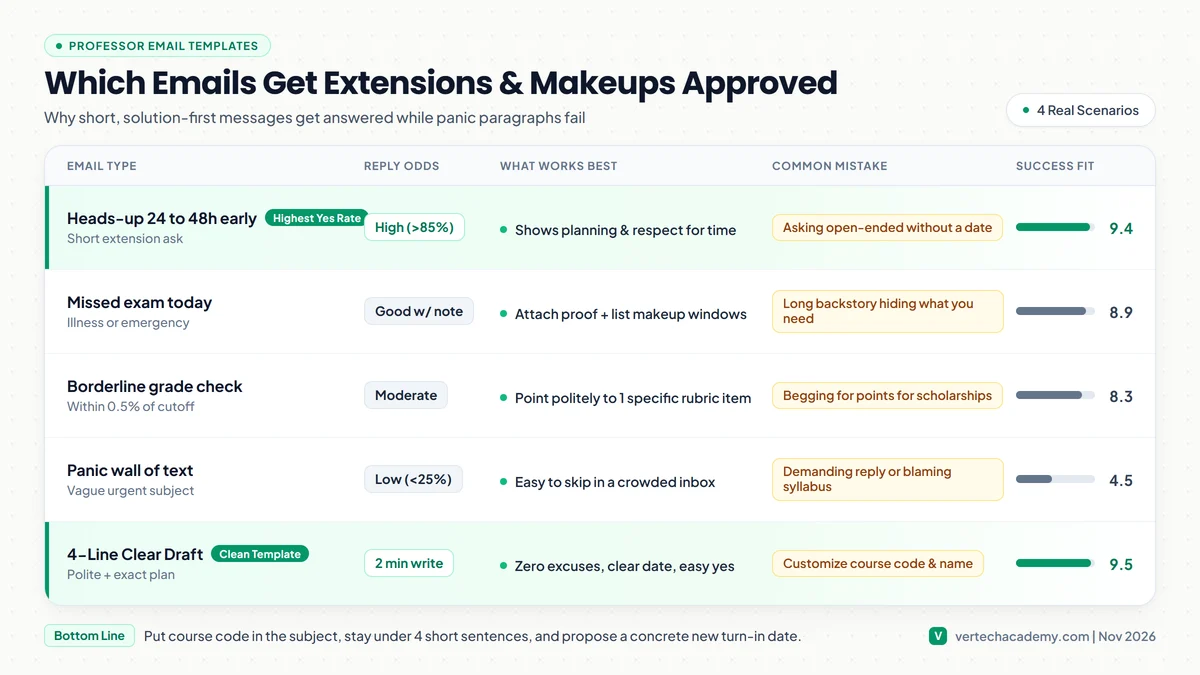
Direct Verdict: Professors approve extensions fastest when your email is under 5 short sentences, puts the course + section code in the subject, skips messy excuses, and suggests an exact day and time you will turn the work in.
Instructors read 50 to 100 student emails every morning. When a student sends four defensive paragraphs without naming their section number or a specific fix, it creates extra mental work and usually gets a quick no.
Use the exact copy-paste templates below for extensions, missed exams, and borderline grades, then keep future deadlines under control with our Syllabus-to-Calendar tool.
1. What Makes a Professor Reply Yes vs. No
Professor Email Scenarios & Approval Odds
4 Common Situations| Situation | Ideal Timing | Key Detail to Include | Never Say This |
|---|---|---|---|
| Essay / Lab Extension | 24 to 48 hours BEFORE due | Exact new date + partial draft | “Can I turn it in whenever?” |
| Missed Exam / Quiz | Immediately (same morning) | Note/proof + 2 open makeup slots | Long medical symptoms story |
| Borderline Final Grade | Within 48h of posting | Specific rubric question or check | “I really need a B for my parents” |
| Missing Assignment Grade | Politely after grades post | Screenshot timestamp of LMS submit | “Why did you give me a 0?!” |
2. Three Ready-to-Send Professor Email Templates
Dear Professor [Last Name],
I have completed an outline and half of the draft for [Assignment Name] due [Original Day], and I am attaching my current progress so you can see where things stand. Due to [brief reason: an overlapping exam schedule / a family matter], could I submit the polished final version by [Exact Day and Time, e.g., Thursday at 5:00 PM]?
If late-work deductions under the syllabus still apply, I completely understand. Thank you for your time and consideration.
Best regards,
[Your Full Name] | [Student ID]
Dear Professor [Last Name],
I missed today’s [Exam/Quiz Name] at [Time] due to [brief honest reason: sudden illness / transit emergency, documentation attached if applicable]. I take full responsibility for missing the scheduled session and want to handle this respectfully.
If your policy permits a makeup exam or re-weight option, I am available during [Slot 1] or [Slot 2] this week. Thank you for letting me know what steps to follow next.
Sincerely,
[Your Full Name] | [Student ID]
Dear Professor [Last Name],
Thank you for a thoughtful semester in [Course Name]. I reviewed my grades on [LMS/Canvas] and noticed I finished at [89.4%], right next to the [A-] boundary. Before final grades lock, could I stop by office hours to briefly review [Rubric Section / Question #4] so I make sure I understood the feedback correctly?
If the syllabus policy keeps all cutoffs strict, I respect that completely. Thank you again for your teaching this term.
Best regards,
[Your Full Name]
3. Check Your Draft With AI Before Hitting Send
Never paste raw emotional rants straight into Gmail or Outlook. Need help polishing a messy draft in 30 seconds or planning the work once your extension is approved? Pair our Homework Planner with our Office Hours simulation guide.
Turn Your Extension Into Completed Work in One Focused Session
Got an extra 48 hours? Break the assignment down with our 38+ step-by-step study coaches across every college subject. All plans (Mini $9/mo, Plus $29/mo, and Unlimited $97/mo) include a 14-day $0 free trial.
Frequently Asked Questions
How early should I ask for an extension? ▼
What if I slept through my midterm or final exam? ▼
Should I wait more than 48 hours if my professor does not reply? ▼
What would you like to do next?
What are you trying to solve right now?
Pick your bottleneck to compare 2026 pricing caps, free student promos, or test our matched AI coach.
Claim free student promos first—never stack two $20/mo chatbots.
Verify your .edu email for Google AI Pro (12 months free) or Perplexity Education ($10/mo), then pair it with our Step-by-Step study prompts so AI quizzes you instead of writing generic summaries.
Compare Deep-Dive Guides (Save $15–$20/mo):