
Every CS student is using AI for coding. The ones who admit it are at least being honest about it. At Vertech Academy, we constantly see students fail whiteboard interviews because they relied on AI to generate code. The difference between the students who are learning and the students who are slowly destroying their programming skills comes down to one thing: are you using AI to understand code, or are you using AI to avoid understanding code?
This post draws a clear line between using AI as a powerful learning tool and using it as an academic dishonesty machine. If you are a CS student, you need to read this, because the way you use AI now will determine whether you actually know how to code when you graduate and someone hands you a problem without a chatbot to solve it for you.
The Real Problem With AI and Coding Assignments
The problem is not that AI exists. The problem is that generating code is absurdly easy, and understanding code is still just as hard as it always was. You can get a working Python script in 10 seconds. But if someone asks you to modify it, extend it, or explain why it works, you are stuck. That gap between "having code" and "understanding code" is where most CS students are failing right now.
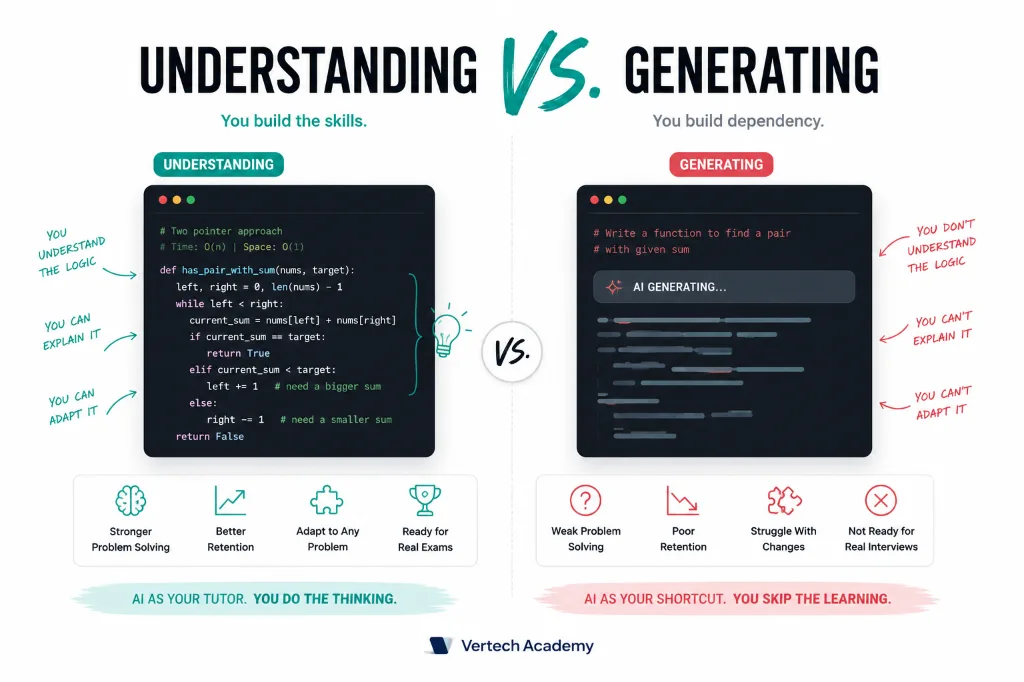
Professors know this. That is why you are seeing more oral code reviews, in-class coding challenges, and exam questions that require you to trace through code by hand. The students who used AI to learn are fine. The students who used AI to skip learning are panicking.
The good news: AI is genuinely one of the best learning tools ever created for programming. It can explain concepts in plain English, walk you through algorithms step by step, debug your code while teaching you what went wrong, and adapt to your exact level of understanding. You just have to use it correctly.
Using AI as a Programming Tutor (Not a Code Generator)
The single most important mindset shift: stop asking AI to write code. Start asking AI to teach you how to write code. The difference is enormous.
Do not ask this
- "Write a Python function that sorts a linked list"
- "Solve this LeetCode problem for me"
- "Here is my assignment, give me the code"
Ask this instead
- "Explain merge sort to me like I understand arrays but not recursion"
- "What is my approach missing? Here is my pseudocode"
- "I wrote this code but it fails on edge case X. Hint at what I am missing"
The Right Way to Debug With AI
Debugging is where AI shines for CS students, and it is the most ethically clear use case. You wrote the code. It does not work. You need help figuring out why. That is learning, not cheating. But there is a method to doing it effectively:
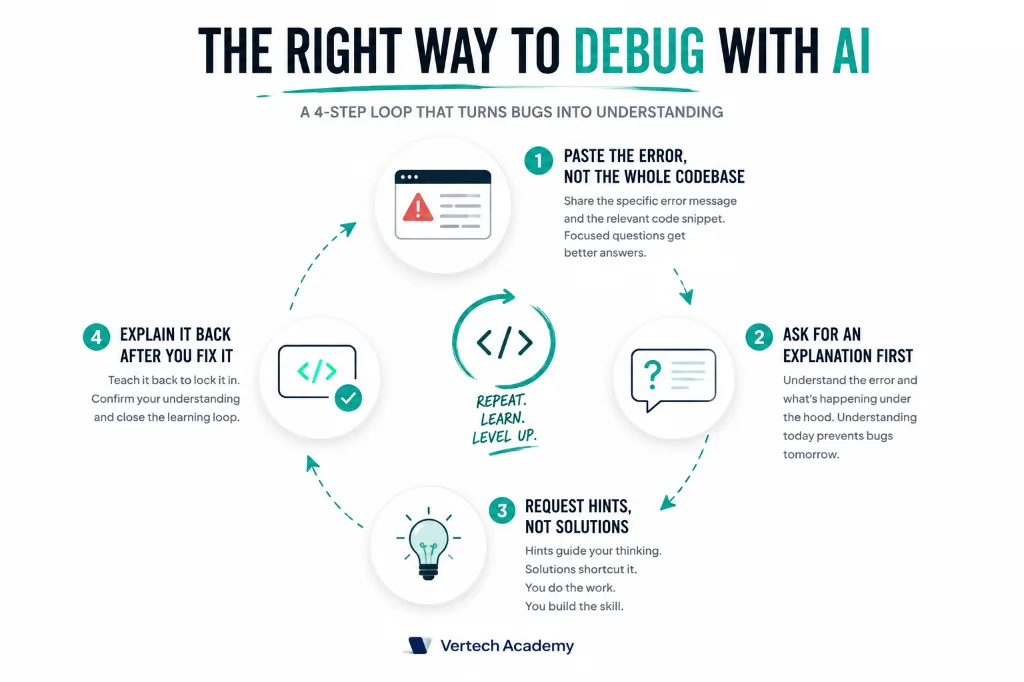
Paste the error, not the whole codebase
Share the specific error message and the relevant function. Do not dump your entire 500-line file. Focused questions get better answers and force you to think about where the problem might be.
Ask for an explanation first, not a fix
Say: "What does this error message mean in the context of my code?" Understanding the error teaches you to recognize it next time. Getting a fix teaches you nothing.
Request hints, not solutions
"Give me a hint about what is wrong with my loop logic" is a learning experience. "Fix my loop" is not. Hints make you think. Solutions make you copy.
After fixing it, explain it back
Once you fix the bug, tell AI: "I fixed the issue by doing X. Can you confirm my understanding is correct?" This closes the learning loop and cements the concept.
For more on how to effectively prompt AI for learning rather than just getting answers, check out our guide on prompt engineering for students.
Using AI to Actually Learn Programming Concepts
AI is the best concept tutor you will ever have. Unlike a textbook, it can adapt its explanation to your exact level of understanding. Unlike a TA, it is available at 3 AM and never seems annoyed by your questions. Here are the most effective techniques:
The explain-like-I-know prompt:
"Explain [concept] to me. Assume I understand [things you know] but I do not understand [the specific confusing part]. Use a concrete example, not an abstract one. After your explanation, give me a small practice problem to test whether I understood."
The practice problem at the end is key. It forces you to apply the concept immediately, which is when real learning happens. If you cannot solve the practice problem, you did not actually understand the explanation, and you can tell AI exactly where you got confused.
Another powerful technique is asking AI to trace through code step by step. If you have a recursive function that confuses you, paste it and say: "Walk me through this function call by call with the input [5, 3, 1]. Show me the call stack at each step." Watching the execution unfold is far more effective than staring at the code and hoping recursion starts making sense.
The "rubber duck" upgrade
Rubber duck debugging (explaining your code out loud to find bugs) is a classic technique. AI takes it further: explain your code to ChatGPT, and it will actually tell you if your understanding is wrong. Say: "I am going to explain what my code does. Tell me if I get anything wrong." Then walk through it line by line. The moment your explanation diverges from what the code actually does, AI will catch it.
Where the Ethics Line Actually Is
This is not as complicated as people make it. Here is the rule: if you can explain every line of your submitted code, why you chose that approach, and what the alternatives were, you are fine. If you cannot, you have a problem.
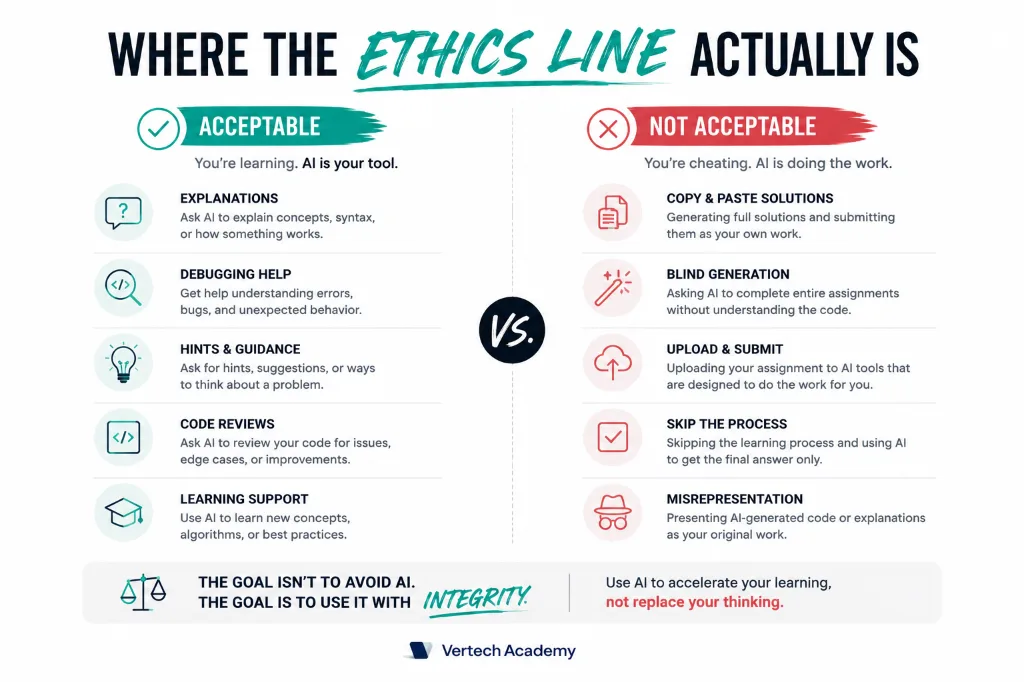
Generally acceptable
- Asking AI to explain a concept or algorithm
- Using AI to debug code you wrote yourself
- Asking AI to review your code for improvements
- Using AI to explore alternative approaches after solving it
- Getting AI to generate test cases for your solution
Generally not acceptable
- Pasting the assignment prompt and submitting the output
- Having AI write entire functions you do not understand
- Using AI-generated code without being able to explain it
- Submitting AI work as your own during exams
- Using AI on explicitly no-AI-allowed assignments
Always check your course syllabus. Many CS programs now have specific AI policies that range from "use it freely but cite it" to "no AI tools on any assignment." Violating these policies, regardless of how you used AI, is academic dishonesty. When in doubt, ask your professor. Most of them are reasonable and will tell you exactly where the line is for their course.
For more on navigating academic integrity with AI across all subjects, see our comprehensive guide: Is It Cheating to Use AI for Homework?
If you are tired of generating code you do not understand, our Brainstorming Expert prompt helps you think through problems step by step, generating approaches and pseudocode without just handing you the answer. It bridges the understanding gap instead of just generating code.
Using AI for Larger Coding Projects
Individual homework problems are one thing, but longer-term projects (capstones, semester projects, portfolio pieces) require a different AI strategy. Here is how to use AI for projects without undermining your learning or your grade:
Architecture first, code second
Before writing any code, describe your project to AI and ask: "What design patterns and data structures would be appropriate for this? Explain why each one fits the problem." Understanding architecture before implementation makes you a better developer. Jumping straight into coding without a plan is how projects become unmaintainable spaghetti, with or without AI.
Use AI for boilerplate, not logic
It is fine to ask AI to generate a basic file structure, database connection setup, or UI scaffolding. This is similar to using a framework or template. The important parts are the business logic, algorithms, and data processing that make your project unique. Those should come from your own understanding.
Code review, not code generation
After writing a function yourself, paste it into AI and ask: "Review this code for bugs, edge cases I missed, and performance issues. Do not rewrite it, just point out what could be improved." This mimics the professional code review process and teaches you to think critically about your own code. Writing code is step one. Evaluating code is step two, and it is a more advanced skill.
Real Scenarios: What Would You Do?
These are actual situations CS students face. For each one, there is a right way and a wrong way to use AI:
Scenario: You are stuck on a recursive function
Wrong: Paste the assignment prompt and ask AI to write the function.
Right: Explain to AI what you have tried, where you are stuck, and ask it to explain the recursive pattern without writing the specific solution. Then implement it yourself.
Scenario: Your code works but you do not understand why
Wrong: Submit it anyway because it produces the right output.
Right: Paste it into AI and ask: "Walk me through exactly what happens when this function runs with input X." Trace through the execution until you understand every line.
Scenario: You need to learn a new library fast
Wrong: Ask AI to write the entire integration for you.
Right: Ask AI to explain the library's core concepts and show you a minimal example. Then write your integration yourself, using AI to clarify specific methods you do not understand.
Scenario: The autograder rejects your code
Wrong: Keep regenerating AI solutions until one passes.
Right: Share the error message with AI and ask what edge case you might be missing. Check the requirements you might have overlooked. Fix it yourself after understanding the issue.
The pattern is always the same: use AI to understand, then do the work yourself. This is not just about ethics. It is about whether you will actually be employable as a developer. In every software engineering interview, you will be asked to code on a whiteboard or in a shared editor with no AI access. The students who learned to code with AI as a tutor will pass those interviews. The students who let AI code for them will not.
If you are working on group coding projects and need strategies for dividing the AI-assisted workflow fairly, see our guide on AI for group projects.
Using AI to Learn New Programming Concepts
When you encounter a new concept in your CS course, say a data structure or algorithm you have never seen, AI can accelerate your understanding dramatically. But the approach matters.
Concept learning prompt:
"Explain [concept, e.g., hash tables] to me in three levels: (1) a plain-English analogy, (2) the technical definition with time complexity, and (3) a simple code example in [your language] with comments explaining each line. Then give me a problem to solve that uses this concept."
The three-level approach works because different types of understanding reinforce each other. The analogy gives you intuition ("a hash table is like a filing cabinet where each folder has a label"). The technical definition gives you precision ("O(1) average-case lookup"). The code example shows you how to actually use it. And the practice problem tests whether you can apply it independently.
After you understand the concept, write your own implementation from scratch without looking at the AI example. Then compare your version to the AI version. The differences will highlight misunderstandings you did not even know you had. This compare-and-contrast cycle is one of the most effective ways to build deep programming knowledge rather than surface-level familiarity.
AI and Version Control: A Professional Workflow
Professional developers never write code without version control, and you should not either. Git is a skill that separates students from professionals, and AI can teach it to you faster than any tutorial. Ask AI: "I just finished a feature. Walk me through the Git workflow: staging, committing with a good message, and pushing. Explain what each command actually does, not just what to type." Understanding Git conceptually prevents the panic that happens when something goes wrong, which it will.
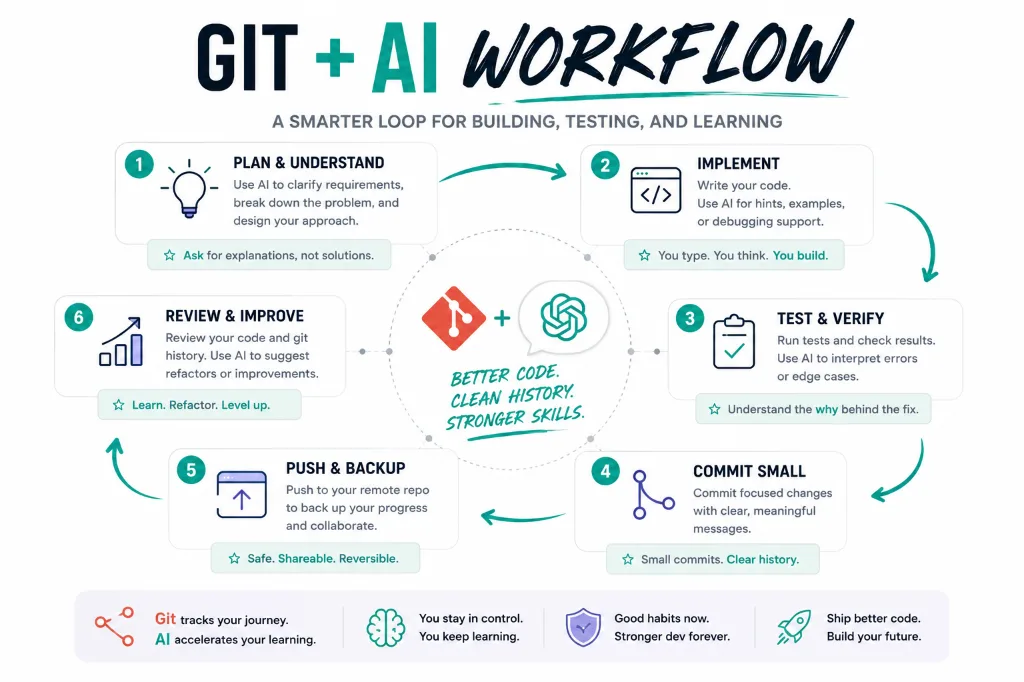
An underrated benefit: if you commit your code frequently, you can always go back to a working version. This makes experimentation safe. You can try AI's suggestion, see if it works, and roll back if it does not. The fear of "breaking everything" disappears when you know you can undo any change. Git plus AI is the most powerful learning combination in programming because it lets you experiment aggressively without permanent consequences.